


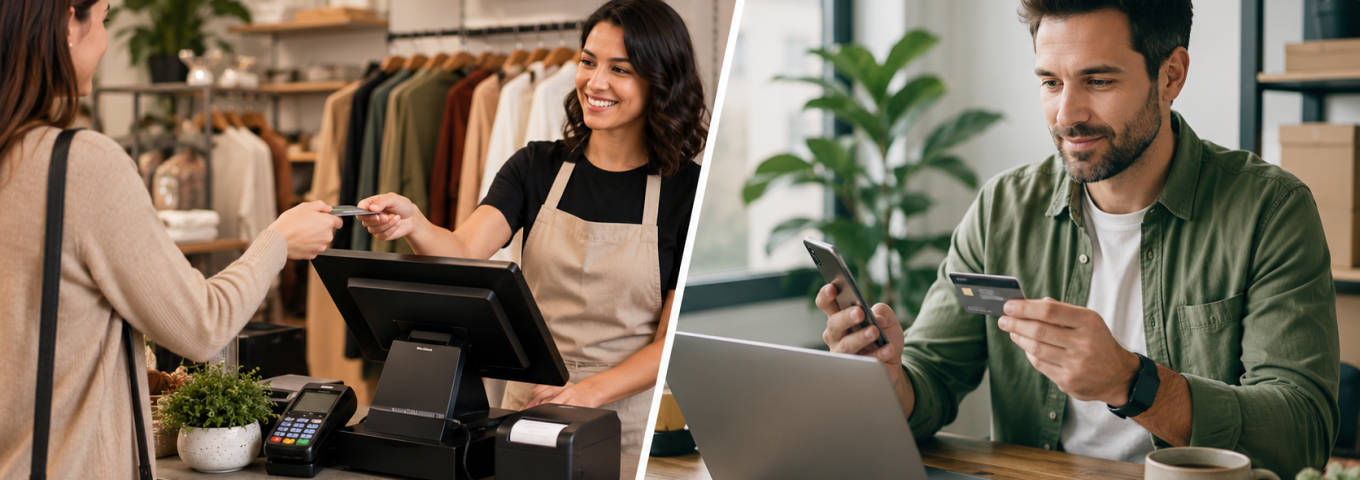
POS Systems vs Virtual Terminals for Small Businesses

Introduction
Small businesses need reliable ways to accept customer payments, whether sales happen in person, online, over the phone, by invoice, or through a service appointment. Two common options are POS systems and virtual terminals. Both can help businesses accept card payments, but they are designed for different payment situations.
A POS system is usually used for in-person payments, such as retail checkout, restaurant payments, salons, repair shops, and storefront transactions. A virtual terminal is used to manually process payments through a secure online dashboard, often for phone orders, invoice payments, service deposits, custom orders, or card-not-present transactions.
Choosing the right credit card terminal for business depends on how customers pay, where transactions happen, whether hardware is needed, and how much flexibility the business requires.
Quick Answer: POS System vs Virtual Terminal
A POS system is best for businesses that accept in-person card payments using a countertop terminal, card reader, or mobile device. A virtual terminal is best for businesses that need to manually enter payments for phone orders, invoices, deposits, service payments, or card-not-present transactions. Many small businesses use both: a POS system for in-person checkout and a virtual terminal for remote or manual payments.
What Is a POS System?
A POS system, or point-of-sale system, helps businesses accept payments at the place where the customer completes a purchase. It can include hardware, software, payment processing, reporting, inventory tools, receipts, and customer management features.
A POS system may include:
Card reader
Countertop credit card terminal
Mobile terminal
Receipt printer
Cash drawer
Barcode scanner
POS software
Inventory tracking
Sales reporting
Employee access controls
Customer receipts
Payment processing connection
POS systems are commonly used by businesses that take payments face-to-face.
What Is a Virtual Terminal?
A virtual terminal is a secure web-based payment tool that allows a merchant to manually enter customer payment details through an online dashboard. It does not usually require physical card-reading hardware.
A virtual terminal may support:
Phone payments
Invoice payments
Deposits
Custom orders
Service payments
Mail order payments
Manual card entry
Recurring payments, depending on setup
Refunds and voids
Transaction reporting
Virtual terminals are commonly used when the customer is not physically present.
POS System vs Virtual Terminal: Main Difference
The main difference is whether the customer is physically present with their card.
| Feature | POS System | Virtual Terminal |
|---|---|---|
| Best for | In-person payments | Phone, invoice, and manual payments |
| Card type | Card-present transactions | Card-not-present transactions |
| Hardware | Usually required | Usually no hardware required |
| Customer location | Customer is present | Customer can be remote |
| Common users | Retail, restaurants, salons, repair shops | Service businesses, consultants, travel agencies |
| Transaction risk | Usually lower than manual entry | Higher because card is not physically present |
| Setup | Hardware + software | Online dashboard |
| Best payment flow | Customer taps, inserts, or swipes card | Merchant enters payment details |
Both tools can be useful, but they solve different payment problems.
When a POS System Makes More Sense
A POS system is usually the better choice when customers pay in person.
A POS system may fit:
Retail stores
Restaurants
Cafes
Convenience stores
Salons and spas
Auto repair shops
Medical offices
Mobile service businesses
Pop-up shops
Trade shows
Gyms and studios
Local service counters
Contractors accepting in-person payment
If your customers bring their card to you, a POS system is often the most practical option.
When a Virtual Terminal Makes More Sense
A virtual terminal is usually the better choice when payments are collected remotely or manually.
A virtual terminal may fit:
Phone orders
Invoice payments
Service deposits
Consulting payments
Travel bookings
B2B payments
Custom quotes
Manual subscription payments
High-ticket service payments
Customer support payments
Payment plan collections
Card-not-present transactions
If your customer is not standing in front of you, a virtual terminal can help process the payment securely.
Can a Business Use Both?
Yes. Many businesses benefit from using both a POS system and a virtual terminal.
For example:
A retail store uses a POS terminal at checkout and a virtual terminal for phone orders
A salon uses POS for in-person appointments and a virtual terminal for deposits
A travel agency uses a virtual terminal for phone bookings and a POS system for office payments
A contractor uses mobile POS on-site and a virtual terminal for invoice payments
A medical office uses POS at the front desk and a virtual terminal for balance payments
Using both can give a business more payment flexibility.
POS System Benefits
1. Better for In-Person Checkout
POS systems are designed for fast, face-to-face transactions. Customers can tap, insert, or swipe their card.
2. Lower Card-Present Risk
Card-present transactions are generally considered lower risk than manually entered card-not-present payments.
3. Hardware Options
Businesses can use countertop terminals, mobile readers, tablets, or full checkout systems.
4. Inventory and Sales Tools
Many POS systems include inventory, reporting, staff management, and customer tools.
5. Customer Convenience
Customers are familiar with POS checkout and expect card acceptance in many physical businesses.
POS System Limitations
POS systems may not be ideal for every payment situation.
Possible limitations include:
Hardware may be required
Equipment costs may apply
Less useful for remote payments
May require staff training
May not fit invoice-based businesses
May need internet or mobile connection
May not support every high-risk industry
Can be more than simple service businesses need
If most payments happen remotely, a POS system alone may not be enough.
Virtual Terminal Benefits
1. No Physical Terminal Needed
A virtual terminal usually works through a secure online dashboard, so businesses may not need card reader hardware.
2. Good for Remote Payments
It is useful for phone payments, invoice payments, deposits, and customer support payments.
3. Flexible for Service Businesses
Consultants, agencies, contractors, travel businesses, and B2B companies can use virtual terminals for custom payment situations.
4. Useful Backup Option
If a customer cannot pay through checkout or a payment link, staff may process the payment manually with authorization.
5. Helpful for High-Ticket Payments
Businesses can review the order or service agreement before manually processing larger payments.
Virtual Terminal Limitations
Virtual terminals also have limitations.
Possible limitations include:
Higher card-not-present risk
Manual entry errors
Customer authorization must be documented
Fraud risk can be higher
Not ideal for busy in-person checkout
Staff must handle payment details securely
Chargeback risk may be higher
May require stronger recordkeeping
A virtual terminal should be used carefully with proper authorization and security controls.
Costs: POS System vs Virtual Terminal
Costs depend on the provider, business type, transaction volume, hardware needs, risk level, and payment features.
| Cost Area | POS System | Virtual Terminal |
|---|---|---|
| Hardware cost | Often required | Usually not required |
| Software cost | May apply monthly | May apply monthly |
| Transaction fees | Based on processing terms | Based on card-not-present processing terms |
| Equipment lease | Possible | Usually not needed |
| Gateway fee | May apply | May apply |
| Chargeback fee | May apply | May apply |
| PCI fee | May apply | May apply |
| Setup fee | Depends on provider | Depends on provider |
| Best cost fit | In-person businesses | Remote or invoice-based businesses |
A POS system may require more hardware cost, while a virtual terminal may carry higher card-not-present risk pricing.
Credit Card Terminal for Business: What to Compare
Before choosing a credit card terminal or payment tool, compare the full setup.
Important factors include:
In-person vs remote payments
Hardware needs
Monthly fees
Transaction fees
Card-present vs card-not-present pricing
Gateway fees
Virtual terminal access
POS software features
Refund support
Chargeback tools
Inventory features
Receipt options
Mobile payment support
ACH/eCheck options
High-risk support
Funding timeline
Customer support
The right choice depends on how your business actually collects payments.
POS System vs Virtual Terminal for High-Risk Merchants
High-risk merchants may need more careful payment setup because processors review business type, chargeback exposure, transaction size, and risk level.
High-risk businesses may include:
CBD stores
Adult businesses
Travel agencies
Nutraceutical brands
Subscription businesses
High-ticket service providers
Bad credit merchants
Coaching businesses
Credit repair companies
High-volume merchants
High-risk merchants should confirm whether the POS system, virtual terminal, and merchant account support their specific industry.
Security Considerations
Both POS systems and virtual terminals must be used securely.
For POS systems:
Use PCI-compliant hardware
Keep software updated
Limit staff access
Use secure internet connections
Avoid storing card data manually
Train staff on payment handling
For virtual terminals:
Use secure logins
Limit dashboard access
Never write down card numbers insecurely
Document customer authorization
Use AVS and CVV checks
Send receipts immediately
Monitor manual transactions
Security protects customers and reduces payment risk.
Chargeback Risk Comparison
Chargebacks can happen with both POS systems and virtual terminals, but the risk profile may differ.
| Chargeback Factor | POS System | Virtual Terminal |
|---|---|---|
| Customer present | Usually yes | Usually no |
| Card verification | Tap, chip, or swipe | Manual entry |
| Fraud risk | Usually lower | Usually higher |
| Authorization proof | Card-present record | Must document customer consent |
| Best prevention | EMV, receipts, clear policies | Authorization records, AVS/CVV, receipts |
| Common dispute reason | Refund or product/service issue | Unauthorized or unrecognized charge |
Virtual terminal merchants should keep stronger records because the customer is not physically present.
Best Payment Setup by Business Type
| Business Type | Recommended Setup |
|---|---|
| Retail store | POS system + optional virtual terminal |
| Restaurant | POS system |
| Salon or spa | POS system + virtual terminal for deposits |
| Auto repair shop | POS system + invoice/virtual terminal |
| Contractor | Mobile POS + virtual terminal |
| Consultant | Virtual terminal + payment links |
| Travel agency | Virtual terminal + online payment gateway |
| Ecommerce store | Payment gateway + optional virtual terminal |
| B2B service provider | Virtual terminal + ACH/eCheck |
| High-risk merchant | High-risk merchant account + approved tools |
The best setup may combine tools rather than rely on one option.
How to Choose the Right Option
Choose a POS system if:
Most customers pay in person
You need a card reader or countertop terminal
You run a retail or restaurant business
You need inventory or staff tools
You want fast checkout
You accept walk-in customers
Choose a virtual terminal if:
You take phone payments
You send invoices
You collect deposits
You sell services remotely
You process custom orders
You need manual payment entry
You are a B2B or service business
Choose both if:
You accept both in-person and remote payments
You run a store and take phone orders
You collect deposits before appointments
You need flexible payment options
You want backup payment processing
Documents Needed for Approval
To set up POS systems or virtual terminals, merchants may need to apply for payment processing.
Common documents include:
Business registration
Owner government-issued ID
EIN or tax details
Business bank account details
Recent bank statements
Website URL, if applicable
Product or service description
Refund policy
Terms and conditions
Expected monthly volume
Average transaction amount
Highest ticket size
Processing history, if available
Chargeback history, if available
POS or virtual terminal use case
High-risk merchants may need additional underwriting documents.
Common Mistakes Small Businesses Make
Avoid these mistakes:
Choosing POS when most payments are remote
Choosing virtual terminal for busy in-person checkout
Not comparing card-present and card-not-present fees
Ignoring chargeback risk
Not asking about hardware costs
Signing long equipment leases without review
Not training staff
Using manual entry without authorization records
Not confirming high-risk industry support
Choosing only based on low rates
Not reviewing monthly fees
Not checking funding timelines
Not asking about ACH/eCheck options
The best payment setup should match the business workflow.
POS and Virtual Terminal Setup Checklist
Before choosing a solution, confirm:
How customers usually pay
Whether hardware is needed
Whether manual entry is needed
Monthly processing volume
Average ticket size
Highest ticket size
Industry risk level
Chargeback history
Gateway needs
POS software features
Virtual terminal access
ACH/eCheck needs
Funding timeline
Monthly fees
Hardware fees
Contract terms
Customer support availability
This checklist can help small businesses choose the right payment tools.
How PayingSource Can Help
PayingSource helps small businesses and high-risk merchants compare POS systems, virtual terminals, merchant accounts, online payment processing, ACH/eCheck options, and payment gateway solutions. Whether the business needs in-person checkout, remote payments, invoice payments, phone payments, or high-volume processing, PayingSource can help review the right setup.
PayingSource can support merchants with:
POS system guidance
Credit card terminal options
Virtual terminal options
Merchant account support
High-risk payment processing
Online payment processing
Payment gateway support
ACH and eCheck options
Chargeback management guidance
High-volume processing support
Application preparation
Reserve and fee guidance
For businesses that need the right credit card terminal or payment setup, PayingSource can help explore practical options.
FAQs
What is a credit card terminal for business?
A credit card terminal for business is a device or payment tool that allows a business to accept card payments. It may be a physical POS terminal, mobile card reader, or virtual terminal.
What is the difference between a POS system and a virtual terminal?
A POS system is usually used for in-person payments with hardware. A virtual terminal is an online dashboard used to manually enter payments for phone orders, invoices, deposits, or remote transactions.
Do small businesses need a POS system?
Small businesses that accept in-person payments usually benefit from a POS system. Service or remote businesses may need a virtual terminal instead.
Is a virtual terminal safe?
A virtual terminal can be safe when used through a secure provider with PCI-compliant tools, staff access controls, proper authorization, and fraud checks.
Which is cheaper: POS system or virtual terminal?
Costs depend on the provider and business type. POS systems may involve hardware costs, while virtual terminals may have card-not-present pricing and gateway fees.
Can high-risk merchants use POS systems or virtual terminals?
Yes, some high-risk merchants can use POS systems or virtual terminals if they are approved by a provider that supports their industry and payment risk profile.
How can PayingSource help choose a payment setup?
PayingSource can help merchants compare POS systems, virtual terminals, merchant accounts, payment gateways, ACH/eCheck options, and high-risk payment processing solutions.
Conclusion
POS systems and virtual terminals both help small businesses accept card payments, but they serve different needs. A POS system is best for in-person checkout, while a virtual terminal is best for remote, invoice, phone, deposit, and manual payments.
Many businesses use both to create a more flexible payment setup. Before choosing, compare customer payment behavior, hardware needs, fees, chargeback risk, security, high-risk support, and funding terms.
Need a credit card terminal for your business? Apply with PayingSource today to explore POS systems, virtual terminals, merchant accounts, and payment processing options.
Leave a Comments